As far as I can tell, it's mostly just an ugly version of iTunes.
* Visuals aside, the UI is basically iTunes. It has the exact same elements in the exact same places, except Winamp looks like a tacky GTK+ theme.
* I couldn't figure out how to hide "Genre", which I strongly dislike, and "Year", which I don't care about.
* No fullscreen on Lion - this takes, literally, 5 minutes to add. I guess they would have to spend some time drawing a completely custom button.
* The largest UI element is the number of seconds that have elapsed in the current song. Is this really something that people care about?
* Sorting by artist seems to be broken - if I sort by artist, it should logically order each artist's albums alphabetically as well. I'm not sure what secondary ordering its actually using - it's not alphabetical by track or ordered by track number (all 1, all 2, ...). iTunes calls the manner of sorting that I suggest "album by artist".
* Scrolling is broken (not smooth). This is also an issue in Spotify.
* For some reason there is a prominent button to show the "About" dialog.
Good things:
* When the track changes, this list doesn't snap back to the new song. This is one of the most annoying features in iTunes.
* When the track changes, if you have searched for something, it doesn't just stop like iTunes. In iTunes, if you start playing a Beatles song, then search for "The Clash", if that Beatles song ends, it will not go to the next Beatles song, because the original song is no longer visible.
* Watch folders, which, if it wasn't ugly, would be reason enough to use it.
> Sorting by artist seems to be broken - if I sort by artist, it should logically order each artist's albums alphabetically as well. I'm not sure what secondary ordering its actually using - it's not alphabetical by track or ordered by track number (all 1, all 2, ...). iTunes calls the manner of sorting that I suggest "album by artist".
It appears to be a stable sort, preserving the existing order of tracks that share the same album name. So to sort by 'album by artist' first sort by album then by artist. IIRC that's how it also works on windows, and is a feature I quite like.
- The options for playlist viewing/filtering are limited. There's no equivalent to iTunes' "column browser", so the only way to (for instance) play a single album is to search for its name!
- There is no tag editor at all. What.
- While you can create playlists, I can't find any way to add tracks to them or reorder them, making them pretty much useless.
- The (light-gray-background) scrollbars look completely out of place on the black background. (This kind of falls under your point of "ugly", but it's sufficiently broken that it's worth calling out.)
I actually don't think the tag editor is a big deal. The only "tag editing" program I use is Picard, and it's just once for each file, which gets it perfectly tagged, renamed, and placed in the proper directory.
Oh, here is another one that I didn't notice at first. Bottom right corner resizing on Lion. Wrong.
All I want is it to load meta-data for 85,000 FLAC files, and allow me to search in a split-second, and then play an album. Oh, and it has to support 24bit FLAC too.
I don't use playlists, I don't care about UI so much.
At home I use a Squeezebox Transporter. Works brilliantly. But in a desktop player WinAmp is the only thing I've found that can scan and handle the collection, and than search it fast. So I run that in a VM.
I realise I'm an edge case, but WinAmp for Mac looks like it fits my need.
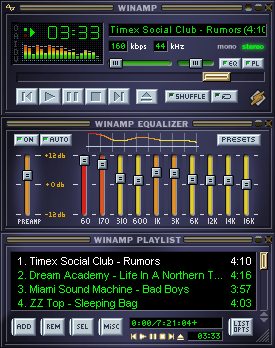
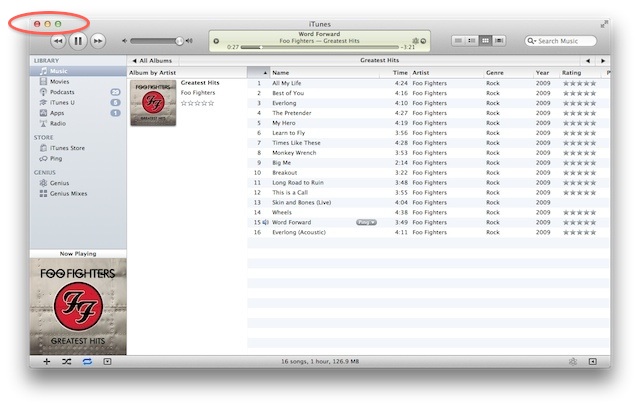
WinAmp's UI(1) was copied by SoundJam MP for the Mac(2) circa 1999. Apple bought SoundJam and turned it into iTunes after overhauling the UI(3) leading to what we have today(4), only to be copied by WinAmp as we see in the OP.
OS X has been a ghetto for music players for some time. If you dont't like iTunes, you don't really have many good options. Hopefully this will ignite some more competition in that space.
This is not in any way comparable with iTunes. It’s a list of your songs. You can create playlists. That’s it.
It’s ugly and it has jerky scrolling. There is no way to edit metadata. It fails completely as a music library and there are much better options available if all you need is a player.
It doesn’t even try to innovate.
What I want is a competent and feature rich music library (iTunes is perfect for this) I don’t have to micromanage (iTunes fails at this). There is nothing there.
I'm not entirely sure it's even trying. I don't have a mac but that page has playing music as the forth bullet point. I think this is supposed to be a program for managing Winamp Android, at least for now.
What do you mean about micromanaging your music library? The only "managing" I do with iTunes is dragging a new music file onto the icon, and maybe adjusting the tags slightly.
There's no database that songs have to be added to, it's just whatever the file/folder structure is for your tracks.
One idea I experimented with was using pytagsfs to mount a virtual file system based on ID3 tags. I could never get it to work though, and the last update to the project was 2009 :(
I have Perian but quicktime lacks VLC's hotkeys for jumping forward/backward and has much worse control over playback speed.
Quicktime 7 also, FWIW, lies about what playback speed it is using. You can drag the slider and then time it and it doesn't play at the speed it's supposed to.
I will admit it's pretty similar to iTunes, but it's cross platform, has some features not in iTunes, and is lacking some iTunes features that really annoy me.
Now, if only it were possible to uninstall iTunes...
Clementine is fantastic, but it isn't really enough. As of now, it doesn't support CD ripping and other all-in-one media player things. It might be a worthy alternative in the future.
Right now this seems to be depressingly sparse, for any music player. If this could get some of the old 2.x basic winamp functionality (shuffle/repeat, support OLD SCHOOL SKINS, and, most importantly, be able to queue up files(my biggest biggest biggest pet peeve against iTunes)) I would ecstatic.
I'm gonna be honest, ever since leaving windows, I was able to say, half joking, but being completely serious, that the biggest thing I missed about windows was winamp (yeah, I"m an old school hold out, but it worked soooo good, and my skin looked sooooo good, and it didnt take up too much space). This player doesn't do it for me, but it shows there is potential. I hope.
Three-second review: Wow, this would be really great if I was still a twelve-year-old boy who thinks that white text on a black background is the bee's knees.
Also that twelve-year-old boy would probably have to not be used to playing all of his music out of a few Smart Playlists. Not that I've downloaded and tried Winamp but I am guessing it doesn't do those because no "iTunes alternative" has ever had that.
But I guess the people who actually spend a lot of time looking at their music player will like this because it can import the awesome skin with a hot anime babe on it that they had to abandon when they switched to a Mac? I guess. I dunno, iTunes spends 99% of its time on my machine hidden, being controlled by Quicksilver hotkeys, and telling me what's playing via Growl alerts.
You must live deep in the land of tl;dr if five sentences is "lengthy".
But thanks for correcting my speculation. Wow. No skin support? That seemed to be one of the killer features of Winamp judging from all the screenshots I used to see. I guess the "killer" feature is "moves music between iTunes and your Android phone", which I've been happily using Salling Media Sync for ever since I got a N1.
This runs great. Unlike iTunes it doesn't check my entire damn music library on the NAS every single time or have tons of bloatware like Ping, iTunes Store, etc. iTunes took on average 3-5 minutes just to start. This starts quickly and immediately loads my music. If it gets updated with some decent features I'd use it exclusively. Another solution people might be interested in is Clementine.
Something has to be timing out with your network share. I have a library tens of gigabytes in size and a three-year-old MacBook Pro, and it the app starts in about five seconds.
iTunes is bloated; I won't argue with that—but it's definitely not slow.
Looks promising, but very basic so far. No shuffle/repeat, enqueueing, or really anything beyond play, pause, previous, and next. It did import my iTunes library in <2 seconds though, which seems impressive compared to iTunes', what, 15 minutes?
Excited to see a hopefully serious competitor to iTunes, it's actually great to see them starting simple. What's there works well.
Keep in mind that iTunes had already done the hard work for Winamp. iTunes has to walk your directory structure, open each file, and read the ID3 tags. That takes real, actual time, especially on a spinning disk. iTunes is probably slower than it has to be, but there is a limit on how fast that sort of thing can be. Parsing a single XML file takes a lot less time.
It took a lot longer than 2 seconds for me as well - about 16k songs.
I just started using Songbird on my Mac at work, and I'm actually pretty happy with it. The interface is pretty close to iTunes, for what it's worth, but it integrates with all sorts of other things. Not really sure if it's a serious competitor to iTunes, though..
I welcome Winamp on OSX , I first used Winamp in 1997-98 and it was liberating in many senses, mp3 could be ripped or downloaded and can build playlists, and later they brought plugins for visualization and DSP.
I am not a iTunes fan, it is more of a necessary evil, as I have many Mac and iOS devices.
I remember using Winamp even before Napster! 1997, I think? The first version with the basic look. I remember my machine was so old that the mp3 I downloaded wouldn't play at the full bitrate. Instead, it played at 64kbps. I remembered thinking how "crappy" mp3s sounded and was lost why everyone thought they were so great. When I finally upgraded (shortly after), my music world completely changed. Ended up buying a Rio PMP300. Amazing how far we've come.
It really whips the llama's ass! Back in 1997, I had a massive 2 GB collection of MP3s.
Edit: The best part was having to sort everything into 45-minute playlists so I could run a cable from my computer's sound card to a tape recorder to make mix tapes for my car.
Awesome; will download as soon as last.fm supports it. In my (albeit limited) search for a music player on OS X, iTunes is the best last.fm supported music player available, which is unfortunate because iTunes blows.
SongBird supports LastFM perfectly, doesn't take 15 minutes to boot, and doesn't come with annoying storefront, ping and other stuff I don't want to see. You should give it a try.
Winamp with the Bento skin, and the 'Local media -> audio' pane open is far better than any player I've come across on the Mac.. I'm really hoping the Mac version gets as good as the Windows version.
The 'Local media -> audio' pane makes it really quick and easy to browse music by genre or artist, and if you rate your songs, your top songs, or top songs by genre or artist.
And the window-shade mode is nice for letting you see what's playing and controlling with minimal distraction and taking up minimal space.
What is wrong with the piece of crap! I used to use winamp a long time ago. Now it just doesn't work.
I tried to play an avi. No. They're all greyed out.
I tried dragging an mp3 into it. No.
Tried dragging mp3 onto the dock icon. Looks like it's working but then nothing happens.
Tried Open File with the mp3 (cmd-L for some reason...) and it lets me pick the mp3 then nothing happens, it doesn't play it or show up on the playlist.
I give up.
On a related note, I saw some screenshots and the windows version now has a bloated, horrible UI, not at all how I remember it.
Here's how it looks for me on Windows XP. It's the classic Winamp skin, the one that has been there for ages.
http://dl.dropbox.com/u/311095/Screenshots/winamp_1.png
Full version, when I turn on the playlist and equalizer. I turn equalizer on just for symmetry; I never actually use it because I'm sorta audiophile and Equalizer Never Helps.
> On a related note, I saw some screenshots and the windows version now has a bloated, horrible UI, not at all how I remember it.
That's probably one of the 'Modern' skins. The 'Classic' skins (from v2.x) still work the same. Windowshade mode is still there and one of my absolute favorite features (most modern skins can't even get this right, let alone other audio players). Each section is still a separate, movable window (player, playlist, equalizer, media library, etc).
iTunes for Mac is a great music player/jukebox. The Windows version is slower, buggier and less responsive. As a result, it's a pretty bad library based music player in Windows (although nowhere close to as bad as people make it out to be).
iOS device management is as flaky on Windows as it is on Mac OS X, which is what they have in common and one of the most frequent complaints. But to be fair, nothing besides iTunes even tries to do device management as comprehensively, so there is little to compare it to. Still, it can be buggy and slow and that is easy to judge even with nothing to directly compare it to.
IMO iTunes gets an excessive amount of over the top flak from techie types. As someone who has used it since version one in Mac OS 9, it's really not that bad. I'm quite picky about my applications and I've been using it every day for around 10 years now. I always check out alternatives when they come up for OS X and they are always much worse in very simple areas, like scrolling. Go ahead, grab almost any alternative music player for OS X and throw in a 20k song library. If it scrolls as smoothly as iTunes, I'll be amazed.
Sorry to have mislead - I was just making a dumb joke (against my better judgment) on the name... Winamp (which was famously skinnable and has "Win[dows]" right in the name) for Mac.
Back when I was on Windows I believe my progression was:
Real Jukebox > MusicMatch Jukebox > Winamp > Foobar2000
Remember the nosedive Winamp took after AOL bought them? But man, I loved how you could double click the Winamp title bar and it would collapse to this tiny little bar that you could snap to your taskbar.
VLC is great if you want to keep it lean, Winamp will give you better library management, upnp device support, Android support (wireless as well) and easier discovery.
If you want to keep it lean, remove the plugins you don't use from WinAmp, and use the classic skin. It basically becomes version 2.x, which is a fantastic player.
Oh, the player repeatedly crashed and the Message Center pop-ups were annoying too, although I did eventually disable them. Later, the proprietary license was a (no pun intended) real turn-off for me.
Well, I wasn't a big music listener; I really used RP at first because its browser mode was the only browser on my WinME computer that worked. Then I started listening to music and browsing the web, and I thought 'I don't need Winamp! This program is cooler! It even has a dancing sheep!' After RealPlayer got on my nerves, and I got a new computer, I used Win Media Player instead and completely forgot about Winamp. :)
Why do all these people talk about Winamp like if it was the best player for windows? Sonique was WAY better, back in the day. Winamp was for the kids who didn't know any better.
The only reason I'd want Winamp on my Mac is for its ridiculously low resource usage. If they're going to make it look, act, and EAT like iTunes, why switch?
i'm using SongBird, and it's quite nice. It reads most formats, sorts songs correctly, sync (though not wirelessly) to about anything. It's more feature complete than this (shuffle, repeat, playlists, lastFM connection, video, etc) and it's open source (yes, that's quite important a feature to me).
"Frankel announced his resignation from AOL on January 22, 2004 on his weblog, stating 'Won't repeat it here (in two words: I've resigned). So begins chapter 3... or something cliché/poetic there. Or wait, does I've count as a single word? ha ha.'"*
Too little too late. I wish they had this when I got my first Mac. Winamp was the shit when I was a kid and I have a fondness for it out of nostalgia but I don't see anything special here unfortunately.
iTunes is... amazingly bad. I was using foobar2000 in wine for a while, but the terrible interaction between X11 apps and spaces got me to switch back to iTunes. I'll probably opt for a CLI solution in the near future.






* Visuals aside, the UI is basically iTunes. It has the exact same elements in the exact same places, except Winamp looks like a tacky GTK+ theme.
* I couldn't figure out how to hide "Genre", which I strongly dislike, and "Year", which I don't care about.
* No fullscreen on Lion - this takes, literally, 5 minutes to add. I guess they would have to spend some time drawing a completely custom button.
* The largest UI element is the number of seconds that have elapsed in the current song. Is this really something that people care about?
* Sorting by artist seems to be broken - if I sort by artist, it should logically order each artist's albums alphabetically as well. I'm not sure what secondary ordering its actually using - it's not alphabetical by track or ordered by track number (all 1, all 2, ...). iTunes calls the manner of sorting that I suggest "album by artist".
* Scrolling is broken (not smooth). This is also an issue in Spotify.
* For some reason there is a prominent button to show the "About" dialog.
Good things:
* When the track changes, this list doesn't snap back to the new song. This is one of the most annoying features in iTunes.
* When the track changes, if you have searched for something, it doesn't just stop like iTunes. In iTunes, if you start playing a Beatles song, then search for "The Clash", if that Beatles song ends, it will not go to the next Beatles song, because the original song is no longer visible.
* Watch folders, which, if it wasn't ugly, would be reason enough to use it.