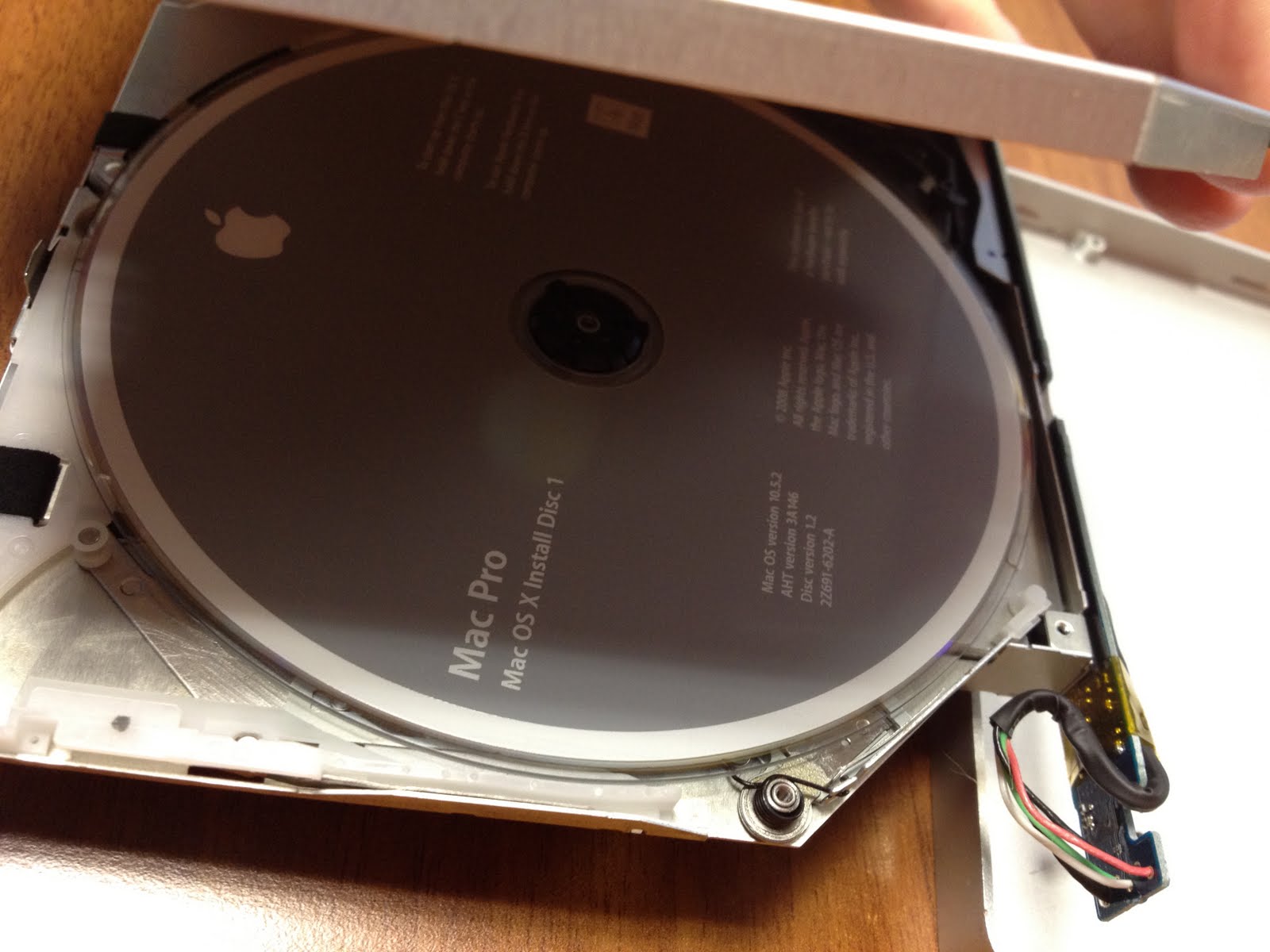
There was a similar issue with older Macbook (and Powerbook) laptops, where certain drives would occasionally refuse to eject a disk. The solution at the time was to insert a piece of folded-up paper into the slot, jamming the disk in place. When you booted the machine, the drive would try to spin the disk up, fail, and then eject it. The timing was hard, since you had to get your makeshift paper jam out of the way as well.
Slight deviation but I'm seeing a telling pattern among my friends which is that after making the jump to a Macbook two or three years ago because of their great experience with the iPod they've now reached the time when it starts needing new parts.
Because the batteries and hard drives are so crazily expensive I see them making the decision that it's cheaper to buy a new PC (possibly even a nice light netbook) then replace the battery / hard drive on their Apple.
Before they'd made the jump I'd encourage them to switch because they hadn't yet "experienced" Apple. Now that they're making an informed decision I can't argue with their reasoning for switching back.
Apple's upfront premium pricing is defensible and sensible but their aftersales costs are doing everyone including them a lot of damage.
My theory is that you are going to need a new laptop every five years, minimum.
If you choose the Apple experience (or a high-class PC laptop for that matter), that will be at least $1000/five years. If you choose a Gateway laptop that will be $400/five years.
From mine and my friend's experiences I would not say that a more expensive laptop will last longer than a cheaper laptop. Most of my friends who are Apple users have had their laptops replaced at least once due to hardware failure. They had AppleCare and usually ended up with a new laptop for free. After seeing their rate of replacement I would never own an Apple laptop without AppleCare because the difference between being stuck with a brick and having Apple replace it with a newer model free of charge is worth the money.
""""After seeing their rate of replacement I would never own an Apple laptop without AppleCare because the difference between being stuck with a brick and having Apple replace it with a newer model free of charge is worth the money.""""
Yeah, but for me the difference between not having to use a PC is worth even more money.
If you're casual about computing, buy whatever, but if you are professional buy what fits your work needs best, be it Mac or PC, not what is cheaper. If $1000 or $2000 / 5 years seem a lot to you as a professional, then you are in the wrong business.
This. For me, the comparison is never between a $1000 Apple laptop and a $400 Gateway one.
The comparison is between a $1000 Apple laptop and an $800-$1000 Lenovo T-series or X-series Thinkpad (or, as I call them, the "real" Thinkpads).
For something that I use for hours every single day, an overly-heavy and shoddily built piece of junk is not an acceptable option. Apple isn't the only manufacturer that makes quality hardware, but the quality non-Apple machines cost much closer to the Apples than the junky Gateway does.
As a linux user I can be fairly hardware agnostic. I used to consider apple laptops when purchasing a laptop. After I purchased my first thinkpad it was a no brainer, the real thinkpads are the perfect linux laptop. The ideapads are not so bad for a cheap tiny netbook thingie. They obviously don't compare to the thinkpad line but they are okay for what they cost...
PS I have the W500 and I'm curious why you do not include it among the real thinkpads.
I've used a Macbook Pro for 3-ish years, and I didn't like its build quality very much.
I just bought a Thinkpad E325, one of the "edge" thinkpads. Its build quality is exceptional for a £350, and I'd say mostly on-par with what I could get from apple nowadays.
It was unclear to me whether you're saying you don't want to use non-Apple hardware, or that you don't want to use Windows, or whether you're referring to a combination of those two.
Though Apple continues to use 'PC' in their marketing, it's an obsolete term. Macs are running on the same hardware these days, and you can run Mac OS on 'PC' hardware. You can run Linux on Apple hardware, and Windows on Apple hardware. So, it's a bit muddled.
I assume by 'PC' you mean 'anything besides OSX on Apple hardware'. Okay. Personally I also run Linux on my MBP... not sure where that fits in.
I'd agree that you'd need a new one every 5 years. I'd also add that there's a difference between a Mac and Windows over those 5 years (I haven't used Linux very long so I can't speak for that OS). Windows becomes so slow that it might as well just be a brick whereas my Macs stay peppy throughout the entire 5 years. The Mac does slow a tad but it's really not much to complain about. My most recent one came with Leopard and I've gone from 10.5 to 10.6 to 10.7 Lion now and she still purrs. All I use is Onyx for occasional maintenance.
I really don't want to start a Mac v. Windows argument as I despise those but it's something I've just noticed as I've replaced my machines over the last 10 or so years. My real point is that in my experience I get my money's worth to the very end with the Macs I've owned.
Having just reinstalled my windows machine, I agree it gets crufty. Windows 7 is lightyears better than previous iterations, though.
However when I had a Mac I remember dealing with fink and ports and ending up with things half-working and just as crufty. I guess that's what I get for going "under the hood", but I needed that software to get the job done and OS X had no better solution for me at the time.
Hard drives? Any laptop hard drive will do. I put a 500GB Seagate hybrid drive in my 2010 Macbook Pro. The installation is much easier on the plastic MacBooks of recent years, where the hard drive is accessible through the battery compartment.
If they're using MacBook Airs the disks are expensive because they're flash, not because of Apple.
Well, to be fair, replacement batteries for Dells are crazy expensive too. When the batteries in my wife's laptop start going bad (which they inevitably do because of her usage pattern) she usually just limps along until we can buy a new machine and hand the old one down.
Batteries are pretty easy to replace in newer (last few years) macs. ifixit.com has really good guides for digging around inside your mac. This (http://www.ifixit.com/Guide/Installing-MacBook-Pro-13-Inch-U...) guide is for my mac from 2009, as an example.
Bought such for a MacBook from dealextreme.com, and was REALLY disappointed -- the battery lasts about an hour or hour and a half. The original used to last about 4 hours.
Non-OEM batteries are a mistake 90% of the time. The quality is just not good. For something that can start on fire, I'm willing to spend the extra 30 bucks to know it's a good battery.
What are the new parts this Macbook is requiring? Batteries will need to be replaced and Apple's prices are around market for these. What specific aftersales costs are you referring to?
Generally it's batteries and hard drives with occasional RAM upgrades too. None of these people have the knowledge or confidence to change these themselves so they see the Apple store as the only option. This of course only multiplies parts and labour costs.
Which is a real shame because the unibody systems are one of the easiest laptops to open up and get to the HD and RAM. It's even documented in the Getting Started guide that comes with the system. Now if they'd just let us change that big ol' battery that's sitting right there it would be a dream.
Well, you can take the battery out. I've taken mine out multiple times: once to dry out my computer, and again to replace the top case after drying out my computer failed to make the keyboard work again.
There's actually very little about a MBP that is difficult to take apart. The part where you have to remove the screen isn't even that hard.
The last MacBook Pro that was hard to take apart and put together again was sold in 2008. I have one from 2007 and it was pretty easy to replace the (non-defective but slow) HDD with an SSD. That’s, as I said, a MacBook Pro that still had the hard to replace HDD. The newer ones make the process much easier.
I’m very annoyed that the battery in newer MacBook Pros isn’t user replaceable. It’s not that the battery is hard to access and replace – certainly no harder than the HDD. I’m guessing there is some sort of legal requirement – probably? Maybe batteries have to be sold with a hard shell, the MacBook Pro battery doesn’t have that in order to save space. Since they can’t sell it on its own (only as part of the device) they can’t make it user-replaceable.
At least it’s priced appropriately (relatively): The replacement will cost you €180 (parts and work), that’s not all that much more compared to the old user-replaceable batteries which cost €140.
But yeah, except for the battery the MacBook Pros are very accessible.
Yeah, the last troublesome Apple laptops I had to deal with were 2001-era iBooks. Those were kinda tricky.
" Maybe batteries have to be sold with a hard shell, the MacBook Pro battery doesn’t have that in order to save space"
And the saved space can either be used for more battery, or to reduce the size of the computer. They save the thickness of the battery case, and the thickness of any internal walls in the battery compartment with which a removable battery would mate. I'd think those walls might need to be somewhat substantial, to keep the battery in and prevent flexing and loose connections.
I suppose in theory they could also use irregularly-shaped batteries, that would let them fill every bit of space with battery.
Presumably the same would be true if they were using a PC laptop or netbook, and they'd pay someone to do the install, thus raising the price?
Pretty much any technically capable person with the requisite torx drivers can install RAM or disk in a Macbook. They are user-installable, so any PC repair type person ought to be able to do it, not just the Apple store.
Hell, you don't even need Torx (although they help). I upped my MBP to 8 GB RAM last week, using an ordinary (albeit miniscule) flathead screwdriver. It did take me about 4 tries to get the DIMMs seated correctly, though.
Do you mean torx bits with the security pin? Torx bits are everywhere, its hard to buy driver/bit kits that do not include most torx sizes. Torx+security pin is a different story. Microsoft switched to using them on all of the 360 controllers recently.
I hope I don't get downvoted too much for this comment that adds little: look up "Elder Sign" on Wikipedia if you don't know what it is. I haven't read Lovecraft and simply thought that Elder Sign was a curious brand name.
This (12 page!!) link shows that first generation MBPs are actually pretty tricky to change the hard drive; but that all 3 generations need a torx driver for the HD.
fans are what i have had to replace on each macbook my partner has owned. that and power cables fraying (they do not replace those for free in chile, so we've been through one expensive power brick after another...).
by the way, for power cables, i have, finally, found a solution: use silicone sealant (the stuff you use around the bath) to make a cable strain relief. it doesn't look that great, but it works. splodge sealant on the cable where it leaves the plug and smooth it out along the cable. the sealant should join the end of the plug and taper out over a few inches of cable.
When you coil up the power cord, make a little loop then wrap it around the poles rather than pulling tight and around the poles.
This helps with strain relief and helps the power adapter stay perfectly in shape longer. I've had my MacBook Pro for 5 years now, same power adapter, haven't had to replace it yet.
I'm going to pick Apple's cheapest laptop with a non-Intel graphics card here for comparison, as I do like to play games and modern Intel cards still seem to suck.
Not entirely comparable, the mbp has a potientially better graphics card (its definitely faster, but having a quarter of the graphics RAM does limit its future proofing), the asus has a higher resolution screen, more RAM, more storage space etc.
On balance, they probably balance out technically. This is pretty clear premium pricing. Whether you consider it worth the premium or not is another matter.
As to the usual claim that this is because Apple products are better built and more durable, Apple are big on planned obselence, so let's say that mbp has a 5 year lifespan. It'll work for five years, probably, but you will want to replace it then.
The Asus is more likely to fail before its obselete, but by the wonders of consumer protection law (n/a for US people, unfortunately), the minimum time before hardware failure forces you to buy a new one is two years. Put your €900 you saved in the bank and buy another one in when it fails (which more realistically is in 3-4 years). It'll be much better than either of these laptops are now.
Lately, I've also been getting frustrated with Apple:
I was setting up someone's iPad for them last night. Installed a couple of apps, then did a jailbreak. Started testing the apps, and found that there was no sound. Battled for a few minutes and thought it had to do with the jailbreak. After some Googling I realised that the side switch was in mute-mode, rather than rotation lock mode.
Why did I have to set someone elses iPad up in the first place? Because in a bandwidth-constrained country, downloading iTunes is a difficult problem - the stupid iTunes switch-on requirement has sunk many people (I've had to set up 3 iPads for other people because of it).
As a South African, I'm forced to create a Kenya iTunes account to buy games, since Apple hasn't bothered, like most other manufacturers have, to get a simple clearance from our Home Affairs department to self-rate games. At least creating a Kenya account is easier than the other "workaround": creating a US account with a fake address, and then buying iTunes vouchers. Of course, there is the risk that Apple will deactivate my account and screw me out of the apps I paid for.
Talking about having a Kenya account, I made the mistake of creating a South Africa account first - ever tried updating apps when you have multiple iTunes accounts? It's a nightmare.
These mostly sound more like issues with South Africa than Apple.
Not really. People in countries like Australia can buy games, even through they have a similar classifications regime. Based on what I've read, Apple hasn't even bothered to approach the South African Film and Publications Board to apply for self-rating:
I'm still seeing that as an issue with South African regulation. Apple presumably sees Australia as a big enough market to navigate the regulation pitfalls there, but they can't be entirely blamed if they feel that South Africa isn't worth the negotiations.
The main problem with South Africa is the bandwidth issue. The fact that you pay per GB is ridiculous. I'm on "uncapped" ADSL myself, downloading hundreds of gigabytes on a monthly basis, but they have their ways of throttling you to discourage you from doing this.
Ditto. I tried calling Apple to ask them to move my account over to a US account, but they said it can't be done, then proceeded to tell me matter-of-factly that the best solution is to abandon my Canadian account (along with all my purchases), start a new US account, and then re-buy all of my apps again (and all this while implying that it was somehow my fault for moving to a different country).
Apple is like the bitchy beauty queen who gets a pass due to her looks. Everything's peaches-and-cream until you hit a bump. Then the claws come out.
Interesting. It seems like it isn't just a problem with Apple though. I've heard similar stories with Xbox Live accounts, where they won't move accounts between countries. I think there may be some laws/regulations involved which are preventing them from moving accounts. Otherwise, it's just silly to not allow people to move accounts, since it should be a simple change in a database somewhere.
I don't really see how your first issue is a reason to get frustrated with Apple. The first thing novice users do when something core like sound isn't working is to start randomly flipping all available buttons and switches, they would have caught that just fine. You just panicked and assumed it was because of the jailbreak. That's hardly Apple's fault.
Also, I don't buy the iTunes thing. Downloading apps on the iPad, using it on the net, and updating iOS isn't a problem but downloading the 80mb iTunes is a killer? I just don't get it. If downloading iTunes really is that brutal, seems like the experience on an iPad would be very disappointing in general. Either way, no company should be catering their core experience towards a situation where downloading an 80mb file is a big hassle. The problem is infrastructure, not iTunes.
It must be hell to set up a printer in South Africa. I grumble about a 300mb download from HP here but if 80mb is so brutal I'm surprised anyone in South Africa even owns a printer.
Finally in regards to games, IMO this is SA's fault. Plenty of countries have ridiculous gaming laws. It's not Bethesda's fault that there are no nukes in the Japanese Fallout 3, it's not Valve's fault that L4D2 is neutered in Australia, and it's not Apple's fault that they have to go out of their way to get a special exemption to rate games themselves in South Africa. Blame your ridiculous laws, every other country manages it with no problem.
"ever tried updating apps when you have multiple iTunes accounts? It's a nightmare."
I have 2 iTunes accounts, one for free apps and one for paid apps (it seemed like a good idea at the time to not expose credit card info unnecessarily). In iTunes I have to log in separately to update my paid and free apps, it's a nuisance but hardly the stuff of nightmares.
I meant rating for age restrictions by the App Store, not end-user ratings.
This is done on a game-by-game basis by a government agency in South Africa, and requires an additional fee, but, based on what I've read, other manufacturers have gotten their internal rating systems approved, so this fee is not applicable. Apple hasn't bothered. They just don't let South Africans buy games.
Do realize it's not Apple not letting South Africans to buy games. It's South African bureaucracy that's preventing South Africans from buying games. The barrier for entry is too high to justify the ROI for Apple to bother. Otherwise, there's no reason for a company to choose to forego more profit per effort.
You want to make it look nice and it breaks quicker? FINE. Just don't complain when I bulk it up with gobs of putty to make sure I get my money's worth out of it.
Assuming you have a working Mac which can power the external Superdrive (all MacBook Airs, I believe most of the recent MacBook Pros and MacBooks, and possibly recent iMacs as well) then you can eject media simply by booting the machine and holding down the trackpad or main USB mouse button. This is triggered by the Mac's firmware and thus will work even if you OS is hosed.
Searching for "eject stuck dvd" on support.apple.com has a knowledge base article covering this tip as its first hit.
Even the first google hit (for me)[1] covers this as a part of its how to guide.
Of course, if for some reason none of your Macs will even POST or you happen to be Mac-less, and you're nowhere within driving distance of someone with a working Mac or an Apple Store the, yes, disassembling the drive is probably a reasonable option.
> Of course, if for some reason none of your Macs will even POST or you happen to be Mac-less, and you're nowhere within driving distance of someone with a working Mac or an Apple Store the, yes, disassembling the drive is probably a reasonable option.
You forget the part about the damaged cable like what can be seen on a few pictures. If the link between the MacBook and the drive is severed, there is no way a firmware on the laptop could cause the disk to eject. And with no forcible eject trigger you're left with the 'cracking the case open' solution.
Shouldn't happen more than once per drive though, so I guess this is why Apple couldn't be bothered with an actual forcible reject button.
EDIT : he seems to claim that the reboot trick does work, so apparently the cable is still at least partially functional in his case.
Your primary solution, i.e. a complete redundant computer system, seems likely to be a bit more expensive than just buying another drive and another copy of the disk's content.
I would recommend not buying the Apple USB SuperDrive and instead buy one of these http://eshop.macsales.com/shop/firewire/optical-drives/ (have no clue why firewire is in the url when most are usb). The works with one machine and not another turned me off to the Apple product. Plus, actual ejection mechanisms are kinda a necessity in this imperfect world.
Do they work on MBA's single USB without external power? I guess they don't. Sadly they have cornered the market on this one. If I'm going to use a drive that isn't portable, then I can use my desktop computer instead 99% of the time.
I bought a generic one, pretty much the first hit on Amazon, and it works fine on the Air. It never occurred to me that this was a difficult requirement to meet anymore.
They come with those dual-headed connectors, but I've never encountered any situation where you had to use both.
Also, the Air's USB ports put out the higher current that the iPad needs to charge faster, hence are even more likely to be able to handle this.
In the olden days some macs used to have a hidden eject lever inside and to the side of the actual slot that you could push with a long thin screwdriver. Has that now gone?
I have to wonder if there was actually a problem with your disc or drive. Everyone assumes an eject button is the magic elixir, but in 5-10 years of supporting Macs I've yet to have a working drive not spit out a disc using one of the regular methods like holding down the mouse button while booting.
I believe they replaced the drive. My problem is that I wouldn't need the drive if I didn't have one by the time but with the CD inside it would make a lot of noise trying to do something to it...
I bought one a few months ago, then got rid of all my CD drives except for one big 5.25" internal CD/DVD drive with USB adaptor that I take out of the closet whenever I get a new CD that I may need in future. I convert the CD to an ISO, load the ISO onto the Zalman, then put the drive and CD in the closet.
Reminds me of my first experience with an OS-X Macbook and how I began to hate Apple. I was creating a web site for the company I was employed by at the time, and being the gung-ho developer I am thought that we should test the site out on one of the new OS-X Macs. Fortunately, one of the techs there had just purchased one and offered to bring it in and leave it on my desk for the day.
So I was poking around the machine (website looked okay), and decided to try out the video playback. I slipped a DVD in, watched whatever the heck it was, and then spent the next thirty minutes trying to figure out how to eject the damned thing since there was no eject button.
If memory serves, there was a paperclip slot for emergency eject. Which is what I ended up doing. Later, the owner came by and showed me the drag to trash thing. I thought (and still do) that not having a physical eject button is a horrible design.
There are several ways of ejecting. Drag to trash. Select the disk icon and choose File->eject, or hit command-E. Use Disk Utility. Use the command line. If all else fails (such as if the screen is borked and you can't see what you're doing and you can't use the network to get in) the disk will eject if you hold down the mouse/trackpad button when the computer reboots. (Not sure how that works with bluetooth mice/trackpads.)
That said, yeah, stupid to not expose access to the eject button on the DVD mechanism.
Sounds like Linux/Windows. Apple is supposed to have one, consistent way to do something.
I think it's pretty clear someone dropped the ball when they decided that "drag the disk to the trash" was the best metaphor. Even if it reassures you that you know what you're doing at the last second as you hold the disc over the trash can.
For the most part things are consistent. In this case there are a few ways to do the same thing. I think that's a good thing in the case some people don't see one way right away.
I always thought the keyboard eject was pretty obvious. There's also the eject icon next to the disc in the Finder. And then the File menu.
I think people make too big a deal over the eject button. If youre used to something else you might bitch a little (especially if you're one of those who always likes to compare Windows and Mac) but generally its not like it happens all the time and the fix is easily available with a quick Google if you haven't heard of it before. I've had discs get stuck in my iMac before. Oh well, it happens on a rare occasion. I try the different methods and move on. Did they really drop the ball or is this just a petty excuse to imply another OS is better? What else could they do? There's like 5 ways to do it by mouse that I can think of, 3 on the keyboard, and on some Macs, the paper clip slot. Everyone needs to chill. It's not like people are ripping apart their computers on a wide scale to remove stuck discs. The whole post came off as a kind of smarmy way to say "oh, look at this bad thing that happened once to my Mac. Looks like Apple sucks now and other options are better because they have a physical eject button ". Really? Come off it.
If you've got to take apart a SuperDrive t get it out then I really feel for you and I can understand the complaint.
When you begin dragging a mounted disk in OS X now, the trash can image on the dock turns into an eject image, although I'm pretty sure that it hasn't always done that.
That said, I agree. I think the Apple designers could come up with a cool way to include an eject button.
Side note, no Mac (as far as I know) has ever had an eject button. Even the original floppy drives were electronic eject (which was really awesome back in the 80's.)
I guess I was referring to a physical eject button (i.e. the kind you would find on a PC). The button on the keyboard just triggers the same call that dropping the CD into the trash does.
The gray oval in the center of the drive door cover is the load of a class 3 lever that pushes the eject button on a relatively commodity optical drive. It was eliminated once the Quicksilver generation came out.
Those early G4s could also be purchased with a ZIP drive, the coverplate to which infuriatingly had a thin section of plastic covering the ZIP eject button, such that you could see the LED in it but not push it. Now that's just mean.
Did you look in the help? I can't say for sure that it was in there then, but searching the help for "eject" on my Mac today gives several different ways to eject a DVD, and I would think that this would have been available before as well.