My concern with backing up iCloud Photos with anything but Apple Photos is that there are some proprietary formats like Live Photos and slow mo video for which exports are lossy. Also, Apple Photos stores all edits non-destructively, so 'flattening' the edits into a single file for export is also a lossy operation.
It seems like an obvious improvement for Time Machine to support full backups while using optimized storage on the primary system.
This. I don't understand why Apple don't have another checkbox beside the Download Originals to this Mac that reads 'Store Backup of Original Photos on Timemachine' This is all that's needed to solve the issue. I actually bought a Mac Studio, and a USB disk, just to be able to download originals of my photos for local backup, since a MBP is effetively a mobil limited device just like an iphone.
"I actually bought a Mac Studio"... "I don't understand why Apple don't " ... wait a minute
My library is large too (roughly a third larger). After years of far more complicated storage/backup solutions, I settled w/ a second Photos library on an external hdd w/ optimize storage disabled. I plug the drive in and open this library every so often to update and then duplicate the drive for an off-site copy. Day to day, I use a Photos library on my primary drive with optimize storage enabled.
I’ve found unreasonable value in being able to search through hundreds of thousands of photos from my phone, so I went all-in on Photos.app. Though one enabling factor is that my photography workflow has drastic simplified in recent years to doing very little post (except for astrophotography, which I try and keep wip out of Photos.app anyway).
I had tried this but found it a little bit weird - switching back and forth on the same device between the 'hard drive w/ full files' library and the 'primary drive optimize storage' didn't really seem easy.
IIRC Photos.app will not even open if the default library you are pointing at is not there (i.e drive was unplugged). Are you able to just open up the library file directly and it will work as expected?
I also recall when changing Photos.app back to the HDD Library it did a ~2h 'rebuild' session before it even started downloading the new photos, but maybe thats acceptable with the 'every so often' approach.
Could the first obvious improvement please be its speed?
My god. The local Time Machine backup is slower on a 10gb network than Backblaze over the Internet. It isn’t even close.
I reinstalled my system and attempted for weeks to get Time Machine to complete a first backup. Every time I started it, the progress bar would fill up about 60% and then stall, and eventually kernel panic if the system was left idle for hours. Never happened before I reinstalled, though I have had it randomly decide the backup is corrupt and it has to start over. macOS deserves a better first-party backup feature.
Asking for anything out of Time Machine is a lost cause. It’s essentially a completed and legacy product.
I migrated to Linux + Pika Backup. For photos I use Ente Photos with their managed cloud storage plus a continuous export to my NAS.
Ente is surprisingly well integrated with iOS, you really don’t need to use Apple’s solution. It automatically backs up photos I take in the background.
I backup ~3-4GB a day with Time Machine to my local NAS and it takes less 10 minutes. Albeit it should take 30 seconds if it was maxing out the network speed.
A huge chunk of that 3-4GB is large files that have minor changes. Time Machine doesn't have any sort of delta support so backups the entire file again, like my local Messages or Contacts database. But I think slowness is caused by file count, not file size, so even though it's backing up 3GB+, the total number of files changes isn't that high. (I suspect).
I also use a modified version of this script[0] to identify everything that changed in the most recent Time Machine backup. This is hugely helpful and lets me find unimportant things that are the source of lots of unimportant changes which I can then exclude with `tmux addexclusion -p <PATH>`. For example I exclude 'node_modules' folders for anything that gets regularly updated. This removes ~10k files that would otherwise be wastefully backed up. Speeding it up is much more about reducing file count than total size.
I’ve used this tool for years and it’s great. But it really saves just the raw data. You’d never get it back in to Apple Photos as nice as when you pulled it out. Metadata is missing. Live Photos come out as an image and a similarly named video. But I treat it as the emergency backup. If some Apple DC burns down or they ban my Apple ID for some reason, at least the photos still exist.
In my experience migrating to another provider from iCloud, this hasn’t been a significant issue. Live Photos in particular are not really proprietary in the sense that they’re implemented in an extremely simple way that basically every photo tool understands. ~~Slow motion videos are also not proprietary, they’re just a plain video file.~~ <<< edit: I think I’m wrong about slow motion
> Slow motion videos are also not proprietary, they’re just a plain video file.
I haven't looked into the implementation details, but Photos lets you adjust the section of the video that is played back in slow motion. I thought if you share a slow-mo video, it gets re-encoded to bake this in (i.e., one second at 240fps gets exported as four seconds at 60fps).
The most annoying thing for me is if you set the date for a photo, it gets stored externally rather than modifying the photo metadata. So when you switch platform, every photo which didn't originally have a captured at date ends up reset to the current day every time you move.
For edits, I don't care too much about just baking them in since it's unlikely I'm going back to old photos and want to undo the crop.
A business analyst friend of mine and SQL novice was given a multi-tabbed editor like this (edit: apparently it was not this brand-new app). We found it difficult to track which query and results tabs are linked, whether they've been refreshed since the query was edited, whether queries in a script have been executed out of order, etc. Hopefully there are ways to address those usability issues.
This SQL Studio which was seemingly released to the public yesterday? Or are you talking about MS's SQL Server Management Studio? The MS one is a beast.
Management Studio is a monster. I was using for years and every so often someone would show me a feature I was totally unaware of that blew my mind.
Visual Studio also had "Database Project" which was amazing. Not seen anything like it. I think everyone moved over to using EF or Fluent Migrations but I loved the Database Projects.
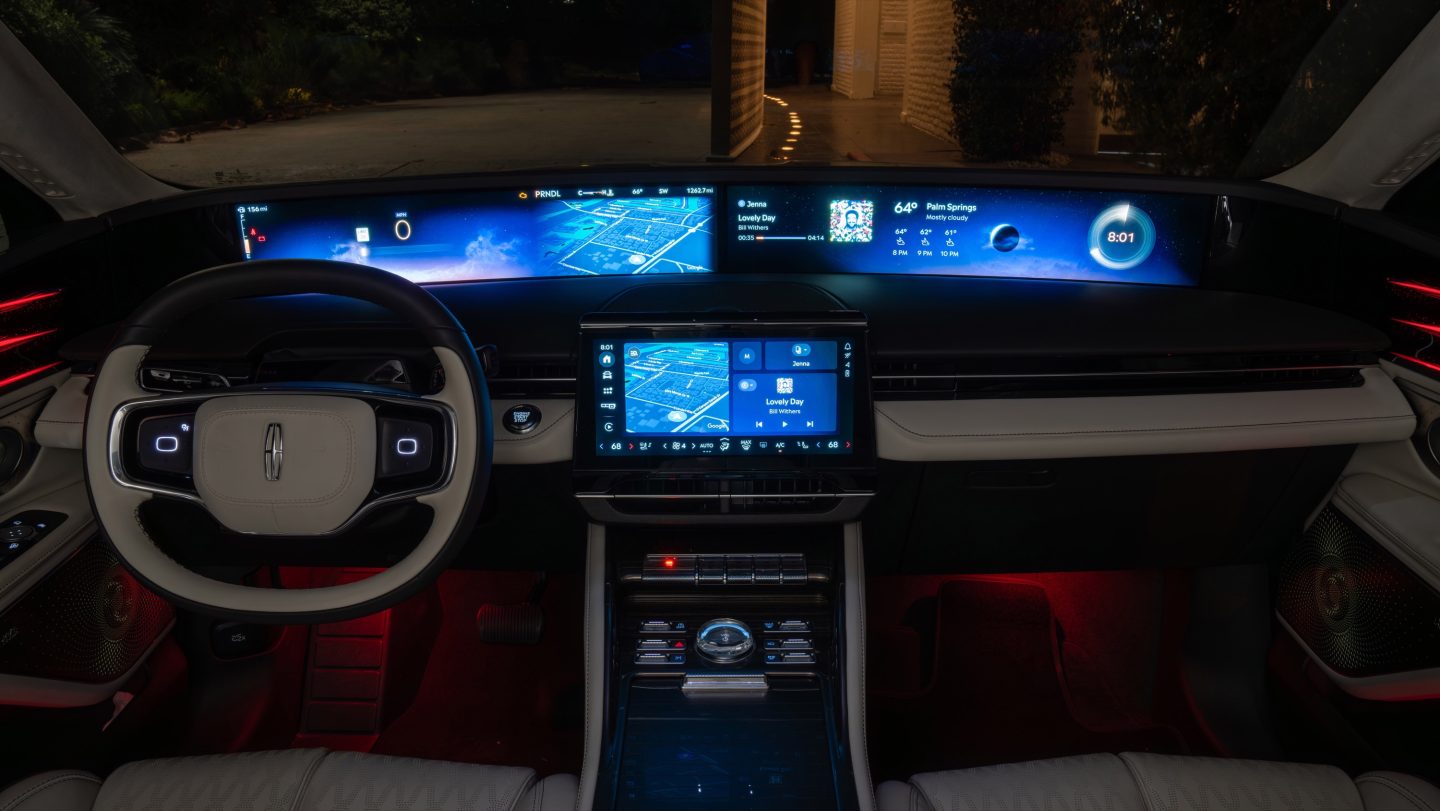
I don't know if it exists in other models, but the Lincoln Nautilus steering wheel features thumb trackpads. On touch it pops up radial menus on a display in the driver's primary line of sight. Although I find the wrap-around display a bit much, the trackpads are an intuitive and thoughtful compromise to the matrix of physical buttons. (The infotainment screen suffers from the same problems as other vehicles, however.)
The short plate came back to bite me: Years after I had moved to another state, an automatic license plate reader on a toll road (91 Express Lanes) in Los Angeles misread someone else's plate as mine. It was kafkaesque: My public records request for photographic evidence was blocked because, if I was correct that the offending driver was not me, the law prohibits the release of records revealing others' driving patterns.
The other plates available when I did a similar search were BO and IR. In retrospect IR wasn't a bad choice.
I have an iteration of NO PLATE, and have received numerous citations and impound notices. At this point, I just ignore them. Registration renewal is possible, only because my local county office understands the situation (years of this).
Of course I could change my license plate, but not'gonna.
This is the lord’s work. It’s ridiculous that in 2025 my $500 gaming PC GPU cannot tell the receiver to change inputs. Even my Apple TV, which is considered a model citizen here, steals the receiver’s input every few hours if I have another device active.
Yeah, the Apple TV isn't better so much as it is very aggressive. I usually have to long press the power button on the Apple TV remote to get it to power off and let go of my receiver.
Other devices like an nVidia Shield or the XBOX require that you press power/home a couple of times to take control of the receiver and switch inputs.
The premise still strikes me as a ridiculous one: Am I possibly a more affluent customer because there is a high pile rug under the coffee table? How much would Charmin pay to know I have two rooms with tiled floors?
What iRobot actually suggested was more mundane: that there could hypothetically exist a protocol for smart devices to share a spatial understanding of the home, and that their existing robot was in a favorable position to provide the map. The CEO talking about it like a business opportunity rather than a feature invited the negative reception.
It didn't help that a few years later, photos collected by development units in paid testers' homes for ML training purposes were leaked by Scale AI annotators (akin to Mechanical Turk workers). This again became "Roomba is filming you in the bathroom" in the mind of the public.
The privacy risk seemed entirely hypothetical—there was no actual consumer harm, only vague speculation about what the harm could be, and to my knowledge the relevant features never even existed. And yet the fear of Alexa having a floorplan of your home could have been great enough to play a role in torpedoing the Amazon acquisition.
> The premise still strikes me as a ridiculous one: Am I possibly a more affluent customer because there is a high pile rug under the coffee table?
I've no idea about rug pile depth, but I'd have thought a simple link between square footage and location would be a reasonable proxy for that affluency.
Not sure that works though for flogging, say, client IP to affluency data to advertisers, unless they can already reliably pinpoint the client IP to an address (which for all I know, maybe they can).
The roombas with cameras don't need an internet connection to work-- they need it if you want the app control features like scheduling. The imagery based navigation is still local.
When I got one in ~2019, I covered the camera and connected it long enough for it to get firmware updates (which annoyingly you can't trigger and it takes a few days)... then I firewalled it off to get no internet access.
I later figured out that if you let it connect and firewall it off it just sits in a tight loop trying to connect again hundreds of times per second which meaningfully depletes the battery faster.
Changing the SSID name so it couldn't connect to the wifi solved the problem.
I'd like to get a new one-- the old one still runs well (with some maintenance, of course) but the latest robot vacuums are obviously better. Unfortunately at least some are more cloud dependent and I can't tell which are and to what degree.
I don't get this, so you're saying than they can and do sell maps of your home to the highest bidder. But... it's actually overblown, even though they're doing exactly what people were concerned they were doing?
It's MY home! I don't want anybody filming it or recording it or selling maps of it. Full stop!
> [iRobot CEO] Angle said iRobot would not sharing data [sic] without its customers' permission, but he expressed confidence most would give their consent in order to access the smart home functions.
The "sharing data" here meant sharing data with other brands' smart home devices but appears misinterpreted as "sharing data with advertisers/data brokers/etc." Say Sonos wanted to make a hi-fi system that optimized audio to your room layout based on Roomba's map.
Upon careful re-reading of the article, I think what the CEO was saying was that they were pursuing becoming the spatial backend for Alexa / Google Home / HomeKit, but the journalist wrote Amazon / Google / Apple, which makes it seem more about advertising data collection than about smart home technology.
(Evidence that this is the correct interpretation: Facebook, despite being a giant data harvesting and advertising operation, was not listed as a potential partner, because they do not have a smart home platform.)
Would the US security leviathan give away other people’s money for highly current floor plans of every residence in the country just on the 1-in-a-million chance they decide to kick in your door and shoot your dog? Probably.
You’re looking at this from a point where the only piece of information about you out there is the data collected by the roomba. In reality, every sensible data broker would just add that signal to your already verbose profile and feed it to a model to determine the stuff you’re likely to buy… or would trigger you to generate engagement or whatever is needed.
The privacy danger here is not the one data point, it’s the unknown amount of other parties who will mix and match it with more data.
With GDPR, I’ve been requesting copies of my telemetry from various corps and it’s amazing the kind of stuff they collect. Did you know kindle records very time you tap on the screen (even outside buttons), in addition to what you read and highlight and pages you spend time on? Now add to that your smart tv’s insights about you and your robot vacuum cleaner … you see now this all grows out of control.
Aside from having parts available, I was unexpectedly impressed that my RoboRock self-emptying dock (c. 2023) was clearly designed for painless serviceability. The ducts are easily accessed via removable panels, and you need only a Phillips screwdriver.
That said, the performance of the robot certainly degraded over time, and I haven't identified the cause to my satisfaction. Obstacle avoidance needs work (especially for charging cables left dangling off the couch), and the map is frustrating to edit and seems to degenerate over a 6 month period.


It seems like an obvious improvement for Time Machine to support full backups while using optimized storage on the primary system.
reply