I came here to suggest the same! It's incredibly handy and I use it all the time at work: there's a process that runs for a very long time and I can't be sure ahead of time if the output it generates is going to be useful or not, but if it's useful I want to capture it. I usually just pipe it into `less` and then examine the contents once it's done running, and if needed I will use `s` to save it to a file.
(I suppose I could `tee`, but then I would always dump to a file even if it ends up being useless output.)
I agree that especially larger players should be proactive and register all similar-sounding TLDs to mitigate such phishing attacks, but they can't be outright prevented this way.
Yes, practically all of my projects are private and visible only to me. Servers IIRC are located in the Netherlands. It's free to use with limitations, and financed by donations from supporters.
I would mostly agree, but I like that I can use tmux locally and remotely and thus have the same interface wherever I do my work (and regardless of what terminal I use).
Then, there's the fact that some terminals capture too many keybindings and get in the way of some terminal code editors I'd like to use (e.g. recently I was again trying to use flow <https://github.com/neurocyte/flow> and its next-tab and previous-tab shortcuts clash with Ghostty's). If I had a terminal that 1) was nothing but a black box with the capability to display Unicode font glyphs and ligatures correctly, 2) works under Wayland, and 3) captures as few keybindings as possible, I'd use it locally with tmux and live happy.
> I like that I can use tmux locally and remotely and thus have the same interface wherever I do my work
The reason I don't do this (even though a trivial config could make this possible) is I want more indications that I'm remote vs local. I'll even change the remote status bar (sometimes theme) so there's more visual indication (an icon helps, but it quickly becomes invisible, just like the hostname). To be clear, I don't have a pattern for every machine, just 2: local vs remote. Everything remote starts with my tmux binding (<C-b> sucks and requires an absurd hand movement, so I use <C-s> because who freezes these days?). With this I still keep all my muscle memory but have a clear signal of "remote vs local" and prevents silly mistakes.
> (e.g. recently I was again trying to use flow <https://github.com/neurocyte/flow> and its next-tab and previous-tab shortcuts clash with Ghostty's)
I don't think I understand this example. There's only so many keybindings and clashes aren't uncommon. There's only 45 control commands (without shift or f-keys) and less than half are convenient due to reach (<C-6> sucks!). Even fewer when you start thinking about "sane defaults" and unfortunately those are biased by the past, so collisions become more likely.
Like I use vim so frequently hit <C-w> while typing and when I'm not on mac I kill browser tabs (probably for the best lol). But the benefit of all CLI programs is the config. There's no "one-size-fits-all" solution, so having configuration is the next best thing.
> If I had a terminal that
I'm not sure what emulator doesn't meet these goals. Foot is a barebones solution, so that might be good for you. But if the issue is clashing with keybindings then that's an unavoidable problem, though luckily solvable. At least the emulators tend to provide better flexibility in this respect than most programs do.
> I don't think I understand this example. There's only so many keybindings and clashes aren't uncommon.
That's precisely my point! Many terminals these days try to do too much and by default end up capturing keybindings that I want to use for something else. The terminal should allow me to do that something else, not get in the way. A simple terminal wouldn't get in my way and I could insert tmux in the more complex scenarios (even for local sessions). I know I can reconfigure most terminals, but not everything is configurable, plus everyone knows the best tools are the ones that don't require to be reconfigured to be great. :)
Thankfully my main editor is Helix and by default it doesn't clash with anything because it's a modal editor where commands are regular keystrokes and not key combinations.
> Foot is a barebones solution, so that might be good for you
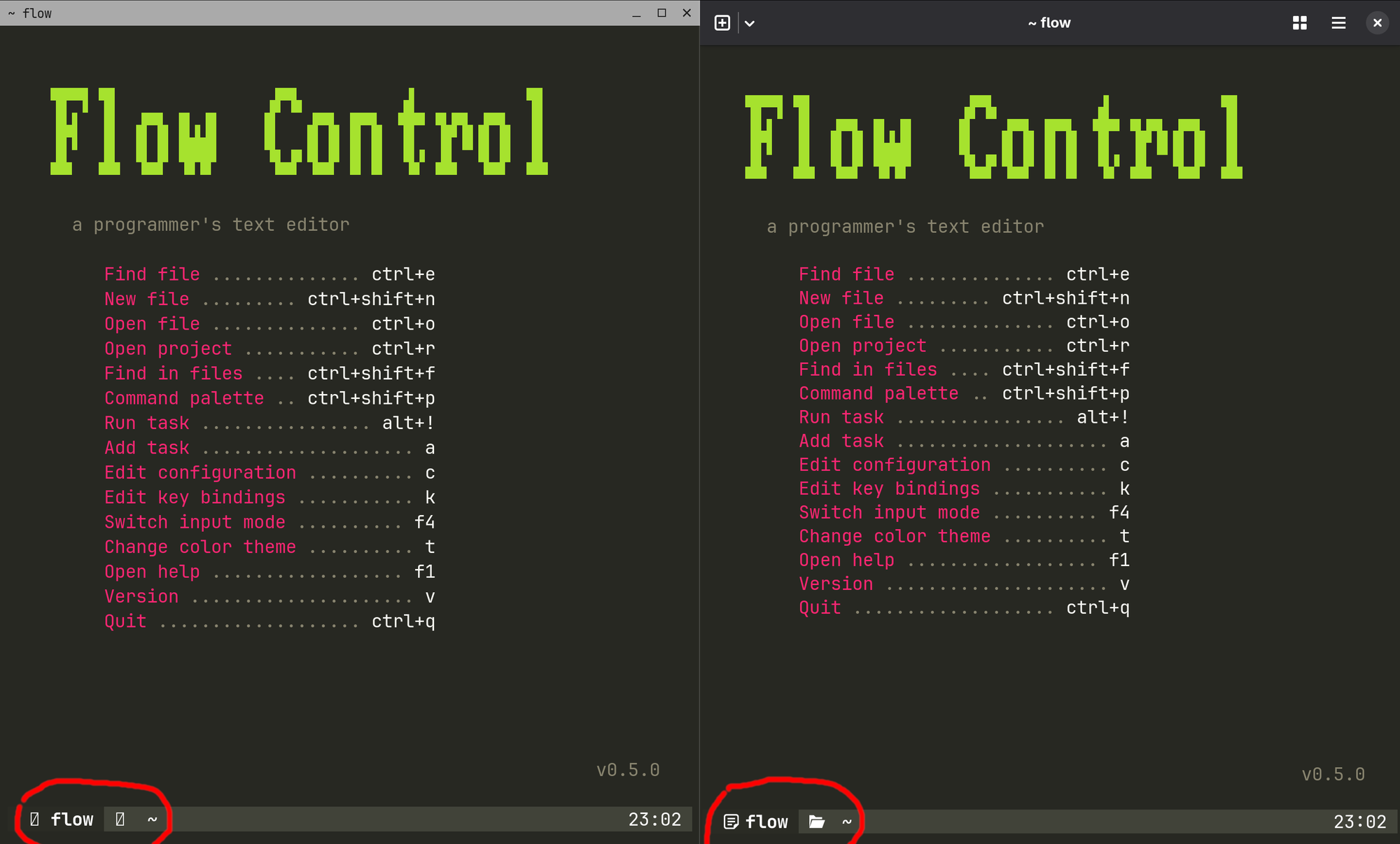
I'm aware of foot, and it works fine, but it doesn't correctly display the fancy icons used by foot (and other programs). For a visual comparison, here's foot on the left, Ghostty on the right: <https://v1.imgpaste.net/images/public/21baee04-b4a5-4693-8a8...>
> I'm aware of foot, and it works fine, but it doesn't correctly display the fancy icons used by foot (and other programs).
These are icon glyphes. You have to set the font setting for the terminal to have them. By default, foot uses whatever you set for the monospace family (you can use the command `fc-match monospace` to find out which font). You may want to use a Nerd Font instead.
Yep, and that's all configuration I'd rather not have to spend time on. I was giving the Ghostty example to show how one of them Just Works™. (But the project goals might just be different, I'm not here to discredit Foot which is a really good terminal emulator.)
I think they are caught off-guard by the fact that (IIRC) ghostty and kitty (and wez?) come bundled with (or load) nerdfonts by default.
Also good command to know `fc-list`. It'll list the fonts on your system (you may want to pipe it into a pager: `fc-list | less`). There's a few fc- commands that deal with fonts for anyone facing these types of issues.
> The terminal should allow me to do that something else, not get in the way.
What terminal gets in the way? If there's a clash you do a remap.
I mean I really don't understand. Do you expect the terminal developer to know all the keybindings you currently use and will use in the future? That's a really big ask! Or are you asking that the terminal comes with no keybindings? I can understand that one, but I think it is not going to be popular. For most people that means more configuration. You can disable anything you don't like.
> Thankfully my main editor is Helix
FWIW I don't have clashes with vim despite vim having both of those
> I'm aware of foot
What font is foot using? It's been awhile, but I don't remember having this issue with foot. But IIRC on foot, and some other terminals, they don't know to use a nerd font by default or maybe just fail to find or prioritize.
Do you expect the terminal developer to know all the keybindings you currently use
i expect terminal developers to keep keybindings to a minimum.
come to think of it, i can't think if a single keybinding that i need from a gui terminal. the only keybindings i need from a terminal are those for tmux, so if a terminal replaces tmux (like wezterm is able to) then those are ok, but otherwise when i run tmux in a gnome terminal then there isn't a single key binding that i need for gnome, except possibly copy and paste.
sadly, i haven't been able to get this to work. whenever i turn mouse support on in tmux or in vim, copy-paste stops working completely. it works within tmux, but i can't copy anything from the terminal to other windows. i tried this with gnome terminal and wezterm. i could not find any setting in gnome terminal to change that. (wezterm i still need to check if there is a configurable option to turn this on).
also, very annoyingly, when i select something in tmux, the selection doesn't stay highlighted. i find that a serious issue that makes tmux selection annoying. another problem: clicking on urls to open them, which is a terminal feature, stops working too.
> i expect terminal developers to keep keybindings to a minimum.
This seems to be one of the goals of ghostty. I don't think keybinding for moving tabs/splits is excessive (as a default). I'd expect every emulator to come with defaults for those.
> there isn't a single key binding that i need for gnome, except possibly copy and paste.
You don't use new tab? New window? You physically click the tab to move tabs?
I mean I'm not trying to harp on your preferences, but I think you have unreasonable asks. I haven't used an emulator where you cannot change or remove those keybindings, so I think that solves your asks. But I think your asks are unreasonable because they don't match the requests of the majority of users. You're totally right that "sane defaults" are not going to be "sane" for everyone. But why isn't that fine? I mean that's why we have configs, right? So that we can make them our own? "Sane defaults" are just an attempt to minimize configuration by trying to match average demand, not try to match every person. I mean we all have dotfiles, right?
I'm just really lost in what you're asking for. You're asking that *defaults* match *your* needs, right?
Because it sounds like you're upset that keybindings exist so... disable them? Is there something you can't disable? I'm really lost here...
I don't think keybinding for moving tabs/splits is excessive
agreed.
You don't use new tab? New window? You physically click the tab to move tabs?
in gnome terminal i don't use tabs at all. i use tmux for that.
gnome has a number of keybindings, most of which start with shift-control, which is a rare combination not used elsewhere. in tmux all bindings start with a leader which is configurable, making it easy to stay away from other key combinations. wezterm can do that too. i am not the person you are originally responding to. i am happy if all keybindings can be changed with a single setting. i don't know if gnome terminal can do that, but it appears that gnome does exactly what we ask for: choose keybindings that don't get in the way.
It's not cleanly one or the other, really. It's UCS-2-y by `str.length` or `str[i]`, but UTF-16-y by `str.codePointAt(i)` or by iteration (`[...str]` or `for (x of str)`).
Generally though JS's strings are just a list of 16-bit values, being intrinsically neither UCS-2 nor UTF-16. But, practically speaking, UTF-16 is the description that matters for everything other than writing `str.length`/`str[i]`.
• Regular indexing (also charAt and charCodeAt) is by UTF-16 code unit and produces UTF-16 code units.
• codePointAt is indexed by UTF-16 code unit, but produces Unicode code points (normally scalar values, but surrogates where ill-formed).
• String iteration doesn’t need indexing, and thus is Unicody, not UTF-16y.
• Approximately everything that JavaScript interacts with is actually UTF-8 now: URIs have long been UTF-8 (hence encodeURI/decodeURI/encodeURIComponent being UTF-8y).
• Where appropriate, new work favours UTF-8 semantics.
—⁂—
Overall, I’d say it’s most reasonable to frame it this way:
① JavaScript models strings as potentially-ill-formed UTF-16. (I prefer the word “models” to the word “represents” here, because the latter suggests a specific storage, which is not actually necessary.)
② Old parts of JavaScript depend on indexing, and use potentially-ill-formed UTF-16 code unit semantics.
③ New parts of JavaScript avoid indexing, and use Unicode semantics.
And most mainstream GUI toolkits are, as well. It can be said that UTF-16 is the de-facto standard in-memory representation of unicode strings, even though some runtimes (Rust) prefer UTF-8.
Why are you guys talking like there were dozens of GUI toolkits in mainstream use? It's basically web stuff, Qt, and then everything else. Web would be UTF-16 as discussed above, Qt is UTF-16, and even if we entertain the admittedly "large just behind-the-scenes" Java/.NET market, that's also all UTF-16. WxWidgets being a fence sitter can do both UTF-8 and UTF-16, depending on the platform.
Which players am I missing? GTK and ImGUI? I don't think they are too big a slices of this pie, certainly not big enough to invalidate the claim.
> LLMs seem to be really good at reproducing the classic Ball of Mud, that can't really be refactored or understood.
This, but but only for code. I've seen "leaders" at work suggest that we "embrace" AI, even for handling production systems and managing their complexity. That's like saying: "We've built this obscure, inscrutable system, therefore we need another obscure, inscrutable system on top of it in order to understand it!". To me, this sounds deranged, but the amount of gaslighting that's going on also makes you think you're the only to believe that...
I forget the exact language, but I think it originally accounted for use of only public media in "marketing and promotional" material, so it didn't include private photos and ML training. This seems to be a step up (or, down, I guess) from that.
Perhaps. I scanned the list and most of them sound like interesting projects that I would like to tackle at some point (or that I have tackled in the past for "fun").
Honestly, I think I was in your same position until recently, then I had some time off work thanks to the newborn and decided to start a "simple" coding project. Since it was purely for fun and to challenge myself, I decided to try and avoid bringing in any dependencies and wrote everything from scratch. This made it much larger and more complex than I had initially anticipated, but despite that (or, maybe, because of that?) I longed for those few hours when I could tinker on my project. Coding suddenly became fun again.


(I suppose I could `tee`, but then I would always dump to a file even if it ends up being useless output.)
reply